Microsoft recently increased the default Dataverse database and file storage included with several Dynamics 365 products and Power Platform licences. The change provides materially more built-in capacity for many tenants. For example, Microsoft’s January 2026 guide lists 30 GB Dataverse database/40 GB Dataverse file included per tenant for core customer-engagement apps such as Sales, Customer Service and Field Service.
This reduces near-term pressure to purchase add-on capacity and gives organisations greater headroom for automation, data retention and AI scenarios.
Key Changes—Default included storage (per tenant)
All numbers below are Microsoft’s default included per-tenant entitlements (December 2025 / January 2026 guidance). Where a product uses Operations capacity, the table shows Operations DB / Operations File values; all other rows show Dataverse DB / Dataverse File.
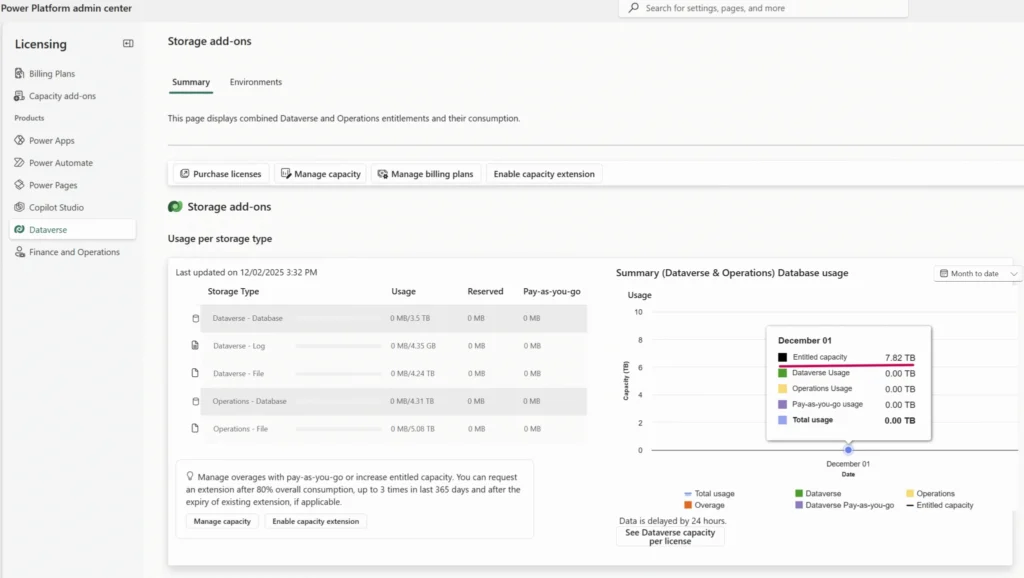
How to verify your tenant totals
These are default entitlements, not your live tenant totals.
Verify authoritative values in Power Platform admin centre → Resources → Capacity before making purchasing decisions.
Included Dataverse and Operations Storage by Product (Per Tenant)
| Product / Category | Dataverse / Operations Database (Before → Now) | Dataverse / Operations File (Before → Now) | Dataverse Log (Before → Now) |
|---|---|---|---|
| Dynamics 365 Sales (Enterprise / Premium) | 10 GB → 30 GB (Dataverse DB) | 20 GB → 40 GB (Dataverse File) | 2 GB |
| Dynamics 365 Customer Service / Contact Centre (Enterprise / Premium) | 10 GB → 30 GB (Dataverse DB) | 20 GB → 40 GB (Dataverse File)* | 2 GB (*Contact Centre voice recordings may have specific file allocations) |
| Dynamics 365 Field Service | 10 GB → 30 GB (Dataverse DB) | 20 GB → 40 GB (Dataverse File) | 2 GB |
| Intelligent Order Management (Dataverse workload) | Not previously specified → 30 GB (Dataverse DB) | Not previously specified → 40 GB (Dataverse File) | 2 GB |
| Dynamics 365 Customer Insights (tenant licence) | 25 GB → 45 GB (Dataverse DB) | 40 GB → 60 GB (Dataverse File) | 4 GB |
| Commerce / Finance / Project Operations / Supply Chain (Operations — standard) | 60 GB → 90 GB (Operations DB) | 40 GB → 80 GB (Operations File) | 2 GB |
| Finance Premium / Supply Chain Premium (Operations) | 90 GB → 125 GB (Operations DB) | 60 GB → 110 GB (Operations File) | 3 GB |
| Human Resources (Operations) | 60 GB → 90 GB (Operations DB) | 40 GB → 80 GB (Operations File) | 2 GB |
| Power Platform / Power Apps / Power Automate (summary) | Per-licence Dataverse DB entitlements increased; allowances accrue and pool at tenant level. Values vary by plan—verify in Power Platform admin centre → Resources → Capacity. | Per-licence Dataverse File entitlements increased; allowances accrue and pool at tenant level. Values vary by plan—verify in Power Platform admin centre → Resources → Capacity. | Varies by licence |
Notes:
- “Before” values above are taken from Microsoft’s Dynamics 365 Licensing Guide (April 2025); “Now” values are from the January 2026 update. Exact tenant allocations and premium-tier values remain tenant- and SKU-specific and should be verified in the Power Platform admin centre.
- *Contact Centre voice/recording storage may be allocated or reported differently for some Contact Centre SKUs. Consult the Contact Centre rows in the licensing guide for SKU-specific allocations.
- Intelligent Order Management: previously not listed with a separate base entitlement; January 2026 guide now shows explicit included values.
Why It Matters
Contemporary Dynamics 365 deployments increasingly rely on low-code applications, extensive telemetry, document and transcript storage, and AI/assistant functionality. These workloads generate substantially more metadata and persisted data than earlier deployments.
Microsoft has adjusted the included Dataverse and Operations entitlements to reflect these patterns and to provide customers with additional capacity, reducing the need for near-term add-on purchases.
How Licence Counts Affect Capacity
Some licence types affect your tenant totals directly. Power Platform licences (for example Power Apps / Power Automate) include per-licence Dataverse entitlements that aggregate into your tenant’s Dataverse pool—so adding more Power Apps licences will increase your tenant’s Dataverse total. ERP licences (Finance, Supply Chain, Commerce, Project Operations, HR) contribute to separate Operations DB/File pools (sized by SKU) rather than increasing Dataverse in the same per-licence manner. Some admin views show combined totals for convenience; always compute tenant totals from your licence inventory and confirm via Power Platform admin centre → Resources → Capacity.
Implications for your organisation
Operational & technical implications
- Immediate headroom: Organisations approaching previous storage limits will typically see a significant increase in included database and file capacity, reducing the immediate need to acquire add-on storage.
- Support for intelligent features: Additional capacity supports adoption of automation and AI features (for example, Copilot artefacts, conversation transcripts and telemetry), enabling expansion with lower operational risk.
- Simplified ERP/CRM capacity management: For tenants running ERP alongside Dataverse workloads, the combined/shared pool improves flexibility in allocating capacity across workloads.
Commercial implications
- Potential to delay or reduce add-on purchases: Customers planning imminent add-on storage purchases should re-evaluate those plans in light of the revised entitlements.
- No change to licence capabilities: This update modifies included storage quantities only; it does not alter functional licence entitlements or user rights.
Industry Impact
Across financial services, utilities, healthcare and professional services, the increase in Dataverse storage enables organisations to retain more meaningful data for longer, without immediate cost escalation. This supports regulatory compliance, operational resilience, and the safe adoption of automation and AI, all while maintaining governance and control.
Financial services (banking, insurance, lending, wealth management)
- Retain longer, auditable customer interaction histories to support compliance, dispute resolution and regulatory requests.
- Store supporting documentation (policies, statements, evidence) within the system of record, reducing reliance on fragmented external repositories.
- Enable AI-driven risk and client insight models with larger, explainable datasets for better model governance.
- Reduce operational friction when producing regulatory reports or audit trails—fewer emergency exports or manual reconstructions.
- Simplify legal hold and e-discovery processes by keeping records discoverable in one platform.
Utilities (energy, water, waste management, field operations)
- Maintain complete asset and maintenance histories (inspections, repairs, warranties) across long asset lifecycles.
- Retain photos, site documentation and compliance evidence without frequent purging, supporting regulatory inspections.
- Improve predictive-maintenance accuracy using richer historical telemetry and event data.
- Support extended offline capture and synchronisation for mobile field teams without storage workarounds.
- Reduce the need for costly external file stores or bespoke archiving pipelines.
Healthcare (NHS trusts, care providers, social care)
- Preserve richer patient and service-user records (assessments, care plans, correspondence) to improve continuity of care.
- Keep referral letters, consent forms and attachments centrally for governance and case reviews.
- Facilitate safer adoption of analytics and decision-support tools with adequate underlying datasets.
- Support auditability and compliance (retention rules, record lineage) with fewer external dependencies.
- Reduce administrative overhead in sharing records across care teams and partner organisations.
Professional services (consultancy, legal, engineering, project-led firms)
- Retain full project histories—correspondence, deliverables, change requests—aiding client transparency and dispute mitigation.
- Store contracts, SOWs and invoices within the delivery platform for simpler billing and audit trails.
- Improve project forecasting and margin analysis through longer historical datasets for utilisation and cost models.
- Reduce document fragmentation across tools and repositories, speeding delivery and knowledge transfer.
- Support richer post-project analysis for business development and lessons learned.
IT, platform owners & administrators
- Lower risk of unexpected storage exhaustion and associated business disruption.
- Greater capacity to run pilots, proofs of concept and sandbox projects without immediate budget increases.
- More time to implement structured governance, archiving and retention policies (less reactive clean-up).
- Fewer emergency add-on purchases—improved budget predictability for capacity planning.
- Simplified reporting where ERP and Dataverse share a combined pool.
Recommended Actions
- Verify tenant entitlements: Confirm your tenant’s authoritative values in Power Platform admin centre → Capacity (inspect Dataverse DB/File/Log and Operations DB/File rows where applicable).
- Reconsider planned add-on purchases: If you had planned storage purchases, pause and review them after the tenant check. You may be able to delay or reduce expenditure.
- Maintain governance: Continue to apply retention policies, archive low-value records and remove unused environments. Increased capacity reduces urgency but does not remove the need for data hygiene.
- If required, purchase capacity add-ons: Microsoft offers Dataverse and Operations capacity add-ons sold in defined units. These add-ons pool at tenant level and apply when included entitlements are exceeded. For unit sizes and pricing, consult the licensing guide or Microsoft sales.
Useful to Know
Q: Will functionality or user permissions change?
A: No. Only the included storage quantities have changed; feature entitlements remain the same.
Q: When will I see the new values in my tenant?
A: Microsoft applies the updated entitlements on a tenant-by-tenant basis. The Power Platform admin centre capacity view is authoritative; if you do not yet see the updated totals this may be the result of rollout timing.
Q: Should we still monitor storage usage?
A: Yes. Regular monitoring and periodic housekeeping remain best practice even with increased included capacity.
Technical/Audit Note
All numeric values and entitlement rules in this article are taken from Microsoft’s Dynamics 365 Licensing Guide (January 2026) and the Power Platform licensing documentation. For tenant-specific verification, rely on Power Platform admin centre → Resources → Capacity as the authoritative source.